
SimpleVault - Password Manager
SimpleVault is a web-based tool that allows you to manage passwords or other secret information in a safe way. All secret information is encrypted using strong encryption algorithms. SimpleVault is particularly useful if you need to manage your secret data, or if you want to share secret information within a working group with trusted members. But it can also be used as a common tool for users who don't trust each other.
This project is kindly hosted by sourceforge.net: http://sourceforge.net/projects/simplevault
Contents:
Features
- Store passwords and other secret information with a web based tool
- High level of security if installed on the local network. Good level of security if installed on a shared host on the internet.
- There is no user account management (this is considered a feature, not a restriction).
- It can be configured
- if all entires are encoded with a global passphrase,
- if each category has it's own passphrase, or
- if each entry has it's own passphrase.
- Very easy to use - very easy to install - very easy to understand!
- No database is needed. All secret data is stored in a single text file, which is easy to back up and copy without security risk.
More Features
- Search for items matching a part of the category name, the title or subtitle.
- The encrypted data block stores the fields: username, password, URL, notes, and one self-defined title and field content.
- Bulk change passphrase: change the passphrase of all items having the same old passphrase.
- Bulk decrypt items having the same passphrase.
- Presentation (templates) is entirely separated from the business logic.
- Special iPhone web gui is included (it currently only supports reading and decryption).
Try it online
An online demo is available. (Please don't misuse the demo. The vault is regularly purged.)
Why is SimpleVault free?
SimpleVault can be downloaded and used for free and it's source code is available under the GPLv3 license. I give it away for free mainly because I'm intensively using other open source products and I want to give back something useful to the community.
Installation and Configuration
Prerequisites are: PHP4 or PHP5 with the mcrypt library.
Download and unpack the SimpleVault package to the directory <install-dir>. By default, /var/lib/simplevault/simplevault.txt is used as the vault file where all encrypted and unencrypted data is stored. This file should be readable and writeable by the web server. A different vault file can be configured in svconfig.php in the variable $vaultfname.
That's it. Go to <your-host>/<install-dir>/index.php and start creating entries.
In the default installation, the vault file contains 2 categories and 4 entries for demonstration purposes. All entries are encrypted with the passphrase toto. You can delete the entries interactively, or by emptying the vault file.
If you have problems please ask your questions in the support forum.
Configuration
In the configuration file svconfig.php (can initially be copied from svconfig.php-dist) there is a configuration section below the lines *** Settings.
- The setting for $dateformat specifies the date format.
- $forcesamepf defines if a global pass phrase is to be used, if each category has its own pass phrase or if each entry can have it's own pass phrase.
- $vaultfname specifies the location where the vault file is stored. This may be a location that is not web readable. However, if good pass phrases were chosen, it is no particular risk to put this file at a web readable location. All precious data is encrypted.
Updating an Existing Installation
Simply replace the files index.php, sv.js, img/* and tpl-* with the new files from the distribution. Check svconfig.php-dist if there are new configuration parameters.
Usage
Quickstart
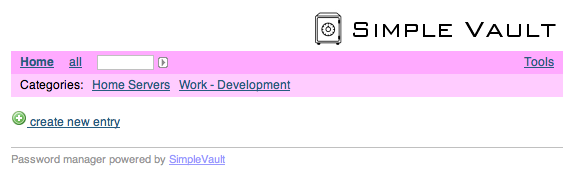
- If you go to the SimpleVault for the first you will see a mostly empty screen with an empty categroy list. In the screenshot below, however, two categories have already been created.
- Start with creating a new item: Define at least the category and a title for the new item. Notice that only the fields in the red box will be encrypted. Finally, set a good password and hit the create button.
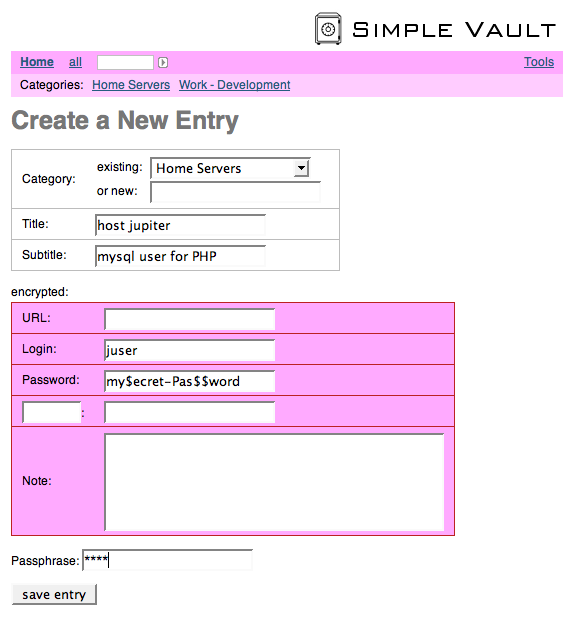
When the item has been created, a short message is displayed. The create dialog doesn't ask you to type in the passphrase twice. Therefore, in order to make sure that you typed in the correct passphrase, it is recommended to decrypt your new item right after it has been created.

- If you have created an item with a new category, the category is automatically created and it will be shown in the top navigation bar. In the example below it's the category Home Servers

- Each item can be encrypted with it's own passphrase.
- To decrypt an item choose its category and the choose the decrypt link
 of the item.

- Note: if you forget the passphrase of an item, there is absolutely no way to decrypt it.
If you have questions please ask them in the support forum.
iPhone Interface
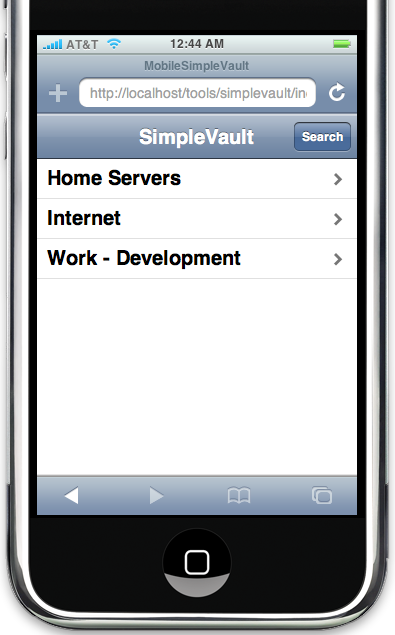
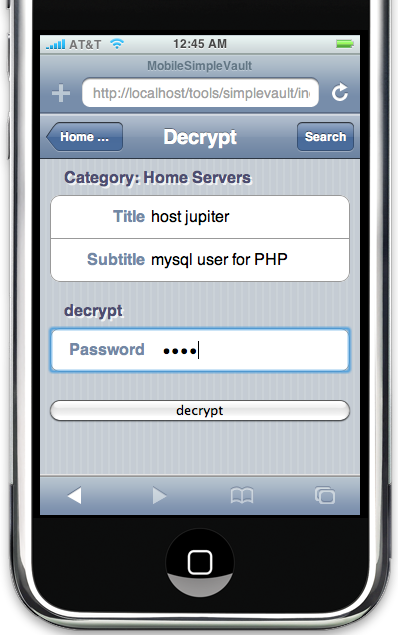
The iPhone interface currently only supports browsing, reading and decrypting items. Editing and creating new items will be added in a future version.
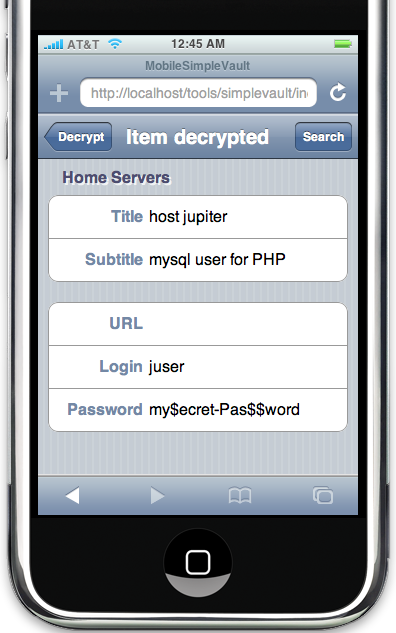
Technical Information
Security
This software has not been designed by a security specialist! SimpleVault is a best-effort approach with common sense security principles in mind. For example, in all input fields scripting tags are automatically filtered or escaped in order to prevent from cross site scripting attacks. But for a really serious application you may prefer one of the bullet proof commercial applications that are available on the market.
The most important functionality of SimpleVault is to encrypt all secret data that has to be stored. The encription uses strong encryption algorithms, and if a good password is used, it is virtually impossible to decrypt the data without knowing the password. This means that even if the vault file is stolen, the secret data is safe. Actually, the vault file could be made publicly accessible without any risk.
However, during the process of using SimpleVault, the secret data is unencrypted at certain times and locations. The red boxes in the table below indicate unencrypted secret data.
|
screen/keyboard
|
browser
|
network
|
web server
|
php script
|
filesystem
|
http
|
|
|
|
|
|
|
https
|
|
|
|
|
|
|
One obvious consequence is, that SimpleVault should only be used over the https protocol. And yes, in our case we use SimpleVault only on our local network behind a completely isolating firewall.
Known Security Risks and Leaks
These are the known potential security risks with SimpleVault:
- For the short moment the PHP script receives data to be encrypted and really encrypting it, the secret data is stored in the server's memory in clear text. Somebody who is capable of making memory dumps of the server is potentially capable of getting hold of the secret data.
There are probably more risks or leaks. Please report them in the forum.
Implementation
All data is stored in one text file - the vault file. As an example you can have a look at the demo vault file of the online demo. And this is the format of the vault file:
- the file only contains iso 8859-1 characters
- one entry (=record) per line
- an entry consists of exactly 10 tab separated fields (it contains exactly 9 vertical tabulators)
- Category
- Title
- Subtitle
- (reserved)
- (reserved)
- (reserved)
- (reserved)
- (reserved)
- (reserved)
- Encrypted secret data block
The fields Category - Title - Subtitle combined together build a unique key for an entry.
- the secret data block is a iso 8859-1 string which has been encrypted and html encoded. The string contains the following 10 single line fields which are separated by new line caracters (the 11th field is a multi-line field). Hence, it contains at least 10 new line characters:
- a constant keyword (the preamble)
- Login
- URL
- Password
- (reserved)
- (reserved)
- (reserved)
- (reserved)
- self-defined title
- self-defined content
- notes, which is a multi-line text field
Credits
Various People have contributed to SimpleVault. Most of them are listed the comments in index.php.
Rolf Brugger, Dec 2011